For parents
Ten minutes a day. And it really sticks.
Learnbits.app practises geography with your child, at exactly the right level. With an explanation after every mistake, a game as a reward, and then it is done. You see exactly what your child knows by heart.
- Try it for a week first
- No ads
- Up to 4 children
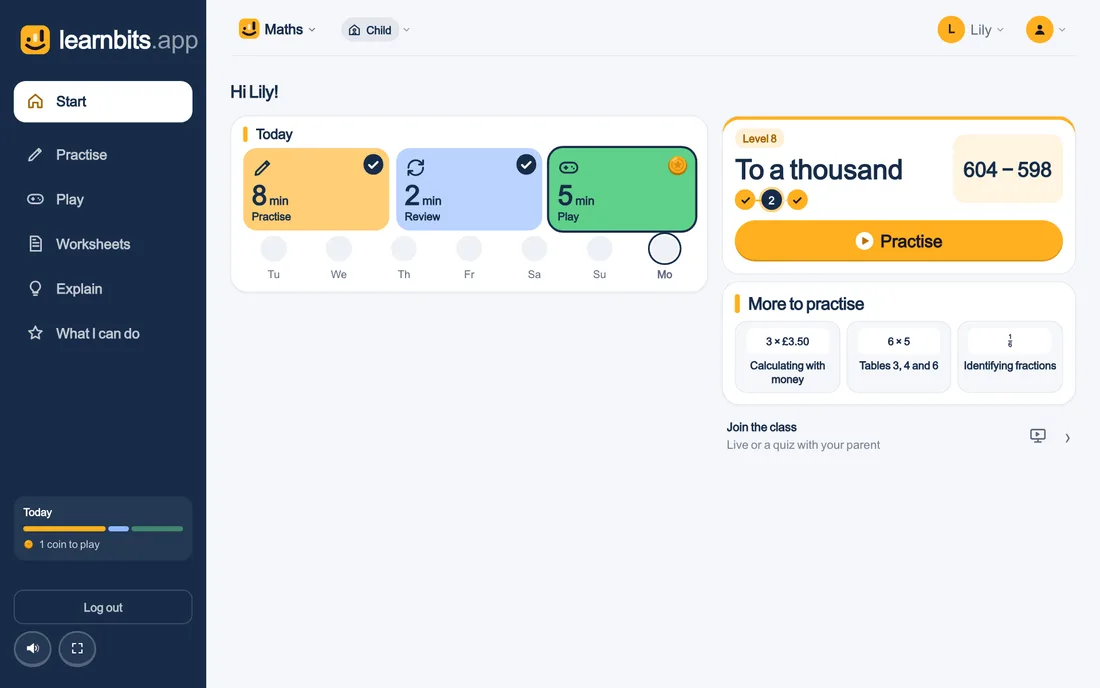
At their own level
Your child starts at the level for their year, or takes a short first round if you like. After that every question adapts: not too easy, not too hard.
An explanation after every mistake
No red cross and move on: your child sees straight away how it does work, and gets the question back later.
You see what they know
Your parent dashboard shows, per sum and per topic, what your child knows by heart and what they are still practising.
No screen-time battles
Short, and then it is done
A session lasts 8 minutes and then it is over. Not a fixed number of questions: a row of fifteen can be rattled through, 8 minutes cannot, because answering faster does not finish it any sooner. The clock is on screen so your child knows how long is left, and it stops whenever nothing is happening.
A day holds 3 sessions, at least 90 minutes apart. After that the app locks until tomorrow. Practising more in a single day demonstrably adds nothing; spreading it out does.
Real learning, not clicking
Your child works out the answer
There is no multiple choice anywhere. Your child types the word, taps the number on a keypad or points at the province on a blank map. Recognising is not remembering, and only the second one stays.
A mistake stops the session. The screen turns, the right answer appears together with the reason why, and the button to continue does nothing for a moment — so the explanation gets read instead of clicked away. That question comes back in the same session.
If your child gets stuck, the in-between step appears: for 15 − 7 the first jump on the number line — five off to reach ten — and never the answer. Asking for it keeps your correct answer, but the fact does not count as “knows it instantly”.
Always the right level
The app knows what your child can do
Your child starts at the level that fits their year, or at the step they choose themselves. Not sure where they stand? Then they take a short opening round per area that adjusts itself: 5 questions from every topic, then questions that follow how it is going — at most 15 in all. From then on the app tracks, per fact, how often it went right and how fast, and rebuilds every session: 10 of the 15 questions are things that already work, 5 are things that do not yet. Enough footing to keep going, enough resistance to learn something.
In your account you see that back per sum, rule or region: what is automated, what is right but slow, and where the trouble sits. Why it works this way — and which research it rests on — is in the evidence; what is practised is in the curriculum.
You keep the overview
See what sticks, and set what is needed
For each subject you see a heatmap down to the single sum: green sticks, yellow is still slow, red does not work yet, grey has not been practised. The building blocks say per step what is going on, and what helps.
Does something specific need practice, the 7 times table for Friday’s test? Set it, from today until Friday: it sits at the top as soon as your child opens the app. Do nothing, and the app chooses what fits their year and progress. You switch games on or off per subject.
A new step only opens once the previous one comes from memory, and whatever has not stuck comes back until it does, spread over the days. That is called mastery learning.
The learning plan
Every day your child knows what to do
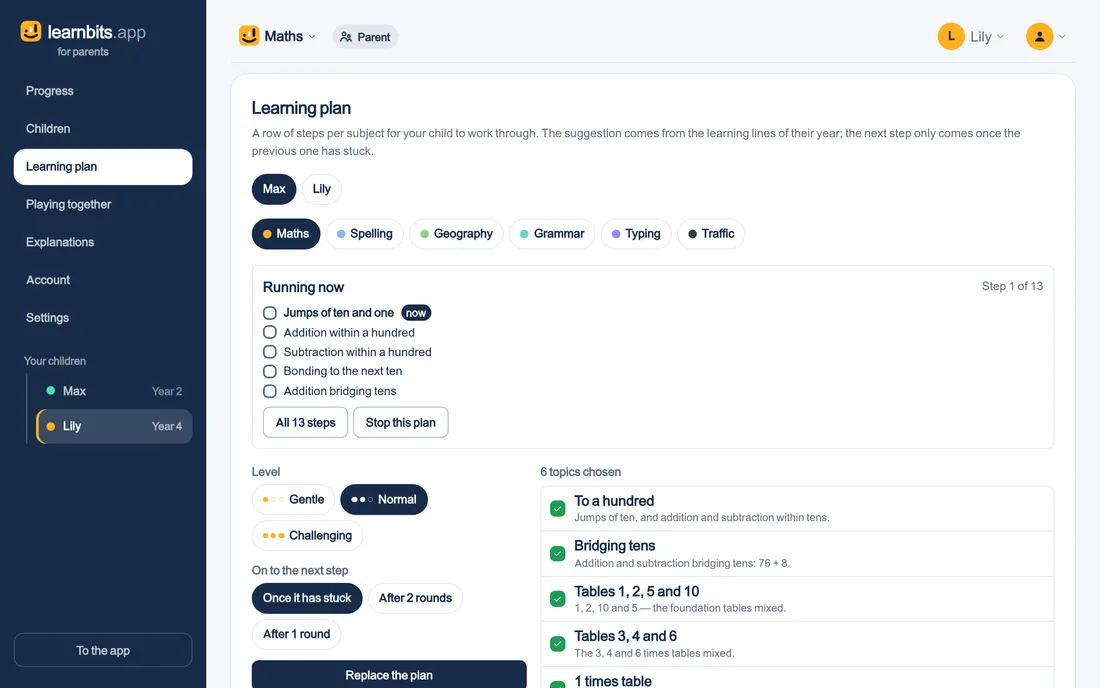
For each child and each subject you set a learning plan: a row of steps your child works through. The suggestion comes from the learning strands for their year; you tick what should be in it and remove what should not.
Choose the level, gentle, standard or challenging, and when your child moves on: once it sticks, or after one or two rounds. Your child sees the plan on Start, the page where they begin every day, and the next step only comes once the last one sticks.
Getting started
All your children in, in one go
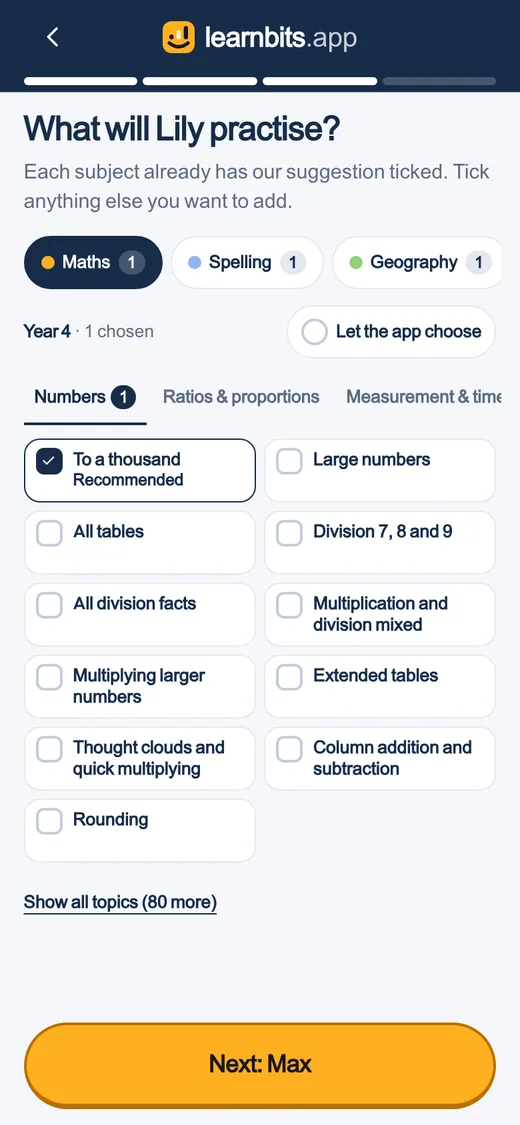
You create one account for the whole family and add your children straight away, up to 4. For each child there is a suggestion per subject that fits their year: tick what they will practise, or let the app choose. Then your child can start.
Want to see how it feels first? Let your child practise for two minutes without an account; nothing is saved, and then you decide.
Safe for your child
No ads, no chat, no leaderboard
- No ads, and nothing to buy inside the app.
- No chat, no other children, no leaderboard.
- Your child needs no account of their own: they practise under yours. A separate sign-in for your child is your choice, and you can withdraw it.
- No photo of your child. A child picks a drawn figure; no image of a child is stored or sent.
- No notification that calls your child back. Nothing ever goes out to the child on its own — a reminder is something you can switch on for yourself, at most.
- No reward for looking after the animal — the moment there is one, it becomes a chore with a wage.
Motivation
Rewarded for every day they practise
The only thing your child is shown about themselves is how many days in a row they were there. Not how many they got right, not how fast, and not how they compare with anyone else. Turning up is the behaviour worth rewarding; the rest is the app’s job.
That streak is the engine: every consecutive day counts on, and the longest streak stands as a record even after a missed day — so starting again stays worth it.
A habit
A fixed moment, without nagging
A habit needs a time. So in your account you can set two fixed moments — around half seven and half five by default — and attach a reminder to them. That reminder is for you, on this device, and never arrives on a day that already had a session. It stays off until you switch it on, and nothing ever reaches the child: no mascot calling, no screen asking for attention.
Together
Play together on the TV, or a quiz
Alongside practising at home there is Live: the same game teachers set up on the whiteboard, now from your own parent dashboard. You start the session, your children join by picking their own name — no code, no second account — and the board itself works on any screen: cast the tab from Chrome, share the screen over AirPlay, or type oefenen.app/tv and the code on the television. Instead of a class report you get a family report, and instead of a class coin a family coin — same rules, same fairness.
Or do a quiz together: everyone gets the same question on the TV, you click on, and your children (and their friends) join with their first name via the QR code.
Try it today
Two minutes with real questions, straight in the browser. Like it? Create an account and your child carries on at their own level. The first 7 days are a trial, without payment details.